Byron [the board]
Table of Contents
Byron [the board]

At 800 hours—another routine precaution—a Berlin agent is sent out to the opium den to transfer Byron. She is wearing asbestos-lined kid gloves and seven-inch spike heels, no not so she can fit in with the crowd, but so that she can reach that sconce to unscrew Byron.
Byron is a flexible, low budget open hardware and free software platform for fast, multiple sensor input, hardware control over USB and microcontroller programming. Byron differs from other solutions in terms of speed, simplicity and low cost. Byron is actively developed.
Byron has now been updated (October 2012) to offer Arduino compatibility. For older byrons see byronold. The bootloader has been updated to usbasploader with a few changes, so that avrdude can now be used to reprogram Byron using a range of applications.
Using a simple software application running on the host PC, Byron is able to assume new identities, functioning one moment as a MIDI device, the next as a microcontroller programmer to flash new devices, the next as a straightforward USB keyboard device. Byron is based on Objective Development's V-USB software. All hardware and software (GPL2 licensed) is available from resources below or: http://1010.co.uk/byron005.tar.gz
Byron can be purchased ready-made and installed for 13 euros from the: shop . All purchases support micro_research development.
Byron is composed of three main elements:
software
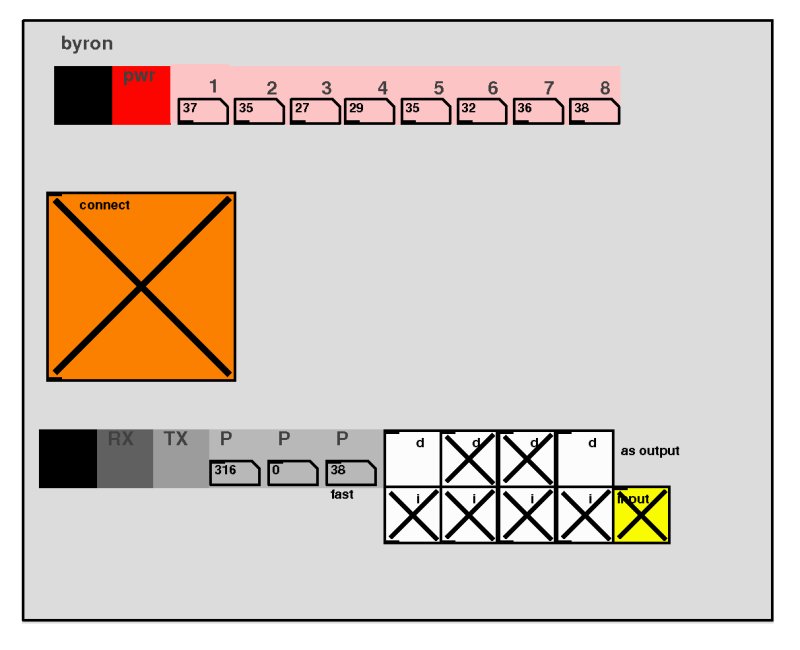
Applications running on Byron and on the host computer. Software includes:
- Byron himself: for flexible sensor input and control using Pure Data. Open Sound Control (OSC) and SuperCollider apps are in development
- straight up HID [Human Interface Device] or joystick device: for easy sensor input into all applications
- programmer: to program any other AVR microcontroller or compatible boards
- USB keyboard input
- MIDI input device
a bootloader
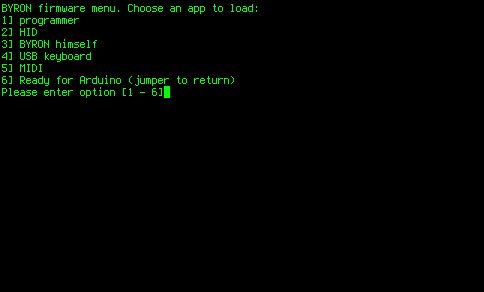
Based on usbasploader and a commandline application to load different applications into Byron [the board] without the need for a programmer or extra hardware. The standard avrdude software can also be used to program Byron.
open hardware

Byron is based around the ATMEL ATmega8 microcontroller and can be produced using either surface mount [SMD] or through hole components [DIP].
Byron offers either six [in the through hole version] or eight [surface mount] high-resolution analogue to digital [ADC] channels for sensor input, three analogue output channels [PWM] and a set of reconfigurable digital input and output pins. The headers also provide access to a serial port, ground and power connections. A standard 10-pen ISP programming header is provided to be able to use Byron as an AVR programmer. Three jumper pins allow Byron to be:
1] erased and flashed with totally new code [marked P]
2] to function as a low speed programmer [marked L]
3] to jump into the bootloader and load a new application/firmware [marked B]
diagrams
- surface mount

- default configuration
Top header: G+12345678

[1.GND.2+PWR.3-10:8xADC IN]

Lower header: GRTPPPDDDD

[1.GND.2.RX.3.TX.4.5.6PWM.7-10:DIGITALI/O]
- DIP
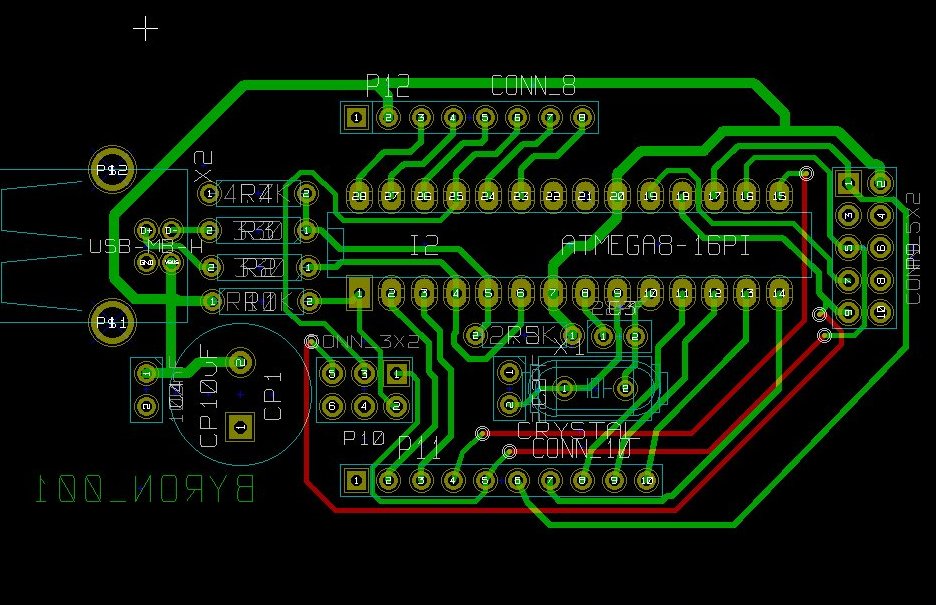
- parts list:
| CP1        10uF               |
| C2         22 PF              |
| C3         22PF               |
| C4         100nF              |
| I1         ATMEGA8-16PU       |
| P10        CONN_10            |
| P11        CONN_10            |
| P12        CONN_3X2           |
| P13        CONN_1             |
| P9         CONN_5X2           |
| R1         10K                |
| R2         330R               |
| R3         330R               |
| R4         4.7K               |
| R5         2.2K               |
| X1         12 MHz CRYSTAL     |
| X2         USB-MB-H CONNECTOR |
- parts list:
HOWTO
make Byron
Print and etch the board from the KiCad design at:
https://code.goto10.org/svn/micro\_research/trunk/scrying\_hardware/byron\_001\_dip.brd
using parts as listed above and following the diagram!
All hardware available from:
https://code.goto10.org/svn/micro\_research/trunk/scrying\_hardware/
Or alternatively purchase a ready made and installed Byron for 13 euros from the : shop
A Byron PCB is also available for only 4 euros from the: shop
install Byron
- 1] install the bootloader
Attach a usbasp compatible programmer to Byron's 10-pin ISP header, place the jumper across P [to be programmed] pins and then in the byron/bootloader firmware directory run:
make flash
make fuse
- 2] install Byron himself
Place the jumper across B [activate bootloader] pins and the from the commandline run the command:
avrdude -c usbasp -p m8 -U flash:w:../../byron/main.hex
change Byron's identity
There are two methods to change Byron's identity:
- 1] Use the B] bootload jumper
From the commandline run the command:
avrdude -c usbasp -p m8 -U flash:w:anysoftware.hex
For example:
avrdude -c usbasp -p m8 -U flash:w:../../keyboard/main.hex
To install the HID keyboard software.
- 2] Use the commandline menu
./byron.sh
in byron/bootloader. To select from programmer, HID, Byron, USB keyboard, MIDI device, or to simply reset the device ready for programming in Arduino or using avrdude. Note that once the device has been programmed with any software except those supplied with Byron it will be necessary to jumper Byron on B to return him to the bootloader. A swift plug and unplug of the USB cable is advised.
interface Byron with software
- PD and byron (himself)
Load the Byron extension and run the example patch:
pd -lib byron byronhimself.pd
Here we can access the 8 analogue inputs (with values from 0-1024) on the top row. From the bottom row we can control the three analogue output signals (PWM) and select either digital input or output for the remaining four pins.
- PD and straight HID
We have six analogue inputs (values from 0-1024) and x digital inputs.
For PD [Pure Data] on GNU/Linux and MAC OS X makes use of the [HID] object: http:// at.or.at/hans/pd/hid.html
Windows: [pd_joystick]: http://crca.ucsd.edu/~jsarlo/pd/
HID example patch:

- SuperCollider and straight HID
Checking sensor types in Supercollider:
    HIDDeviceService.buildDeviceList(0, 0);
    HIDDeviceService.devices.at(0).queueDevice;
//replace 0 with your device number
//or just be sure to plug your device in last.

    (
        HIDDeviceService.action_({arg productID, vendorID,
           locID, cookie, val;
            ( "Element Number: "++cookie++" Value: "++val ).postln;
        });
)
with thanks to: www.randomfunction.com
See also the GeneralHID helpfile.
- OSC and HID
SDL based python standalone application that sends out via OSC any HID device (gamepad, joystick) event generated data:
http://www.ixi-audio.net/content/body\_backyard\_python.html
And hidtoolosc:
http://1010.co.uk/hidclient02.tar.gz
Usage:
./hidtool read 5
Which reads analogue 10 bit values form channel 5 to STDOUT. [first rmmod usbhid to detach driver]
Also included eegtool and hidtoolosc [channel] [IP] [port] for HID to OSC message forwarding.
- avrdude with byron as programmer
Byron offers a standard 10 pin ISP (In System Programming) cable for programming all AVR parts. The middle jumper (labelled L) must be closed to allow programming of low frequency parts (eg. straight from the factory 1MHz).
For further details on avrdude and other software please see:
- USB keyboard
Plug and play. All available keys apart from the last two on the top row (last two analogue input pins).
- USB MIDI
Plug and play. The analogue input pins on the top row can be used for MIDI control signals. Eight digital inputs are provided on Byron's bottom row (reading right from GND). These represent MIDI notes and can be pulled to GND or 0v to switch them.
- Byron and Arduino
- Getting started
- Add the following to boards.txt (in hardware directory):
##############################################################

byron.name=BYRON

byron.upload.protocol=usbasp
byron.upload.maximum_size=7168
byron.upload.speed=19200

byron.bootloader.low_fuses=0xdf
byron.bootloader.high_fuses=0xca
byron.bootloader.path=atmega8
byron.bootloader.file=ATmegaBOOT.hex
byron.bootloader.unlock_bits=0x3F
byron.bootloader.lock_bits=0x0F

byron.build.mcu=atmega8
byron.build.f_cpu=12000000L
byron.build.core=arduino
byron.build.variant=standard
- Select BYRON in the board menu or in .arduino/preferences.txt
And then to program from Arduino IDE:
- Plug in Byron with B jumpered
- Upload sketch
- Replug Byron with B unjumpered
And so on…
- Pin Mapping
Top pins (from left): GND, PWR, Analog input 0-7
Lower pins (from left): GND, digital pin 0 (RX/D0), digital pin 1 (TX/D1), D9/PWM, D10, D11/PWM, D8, D5, D6, D7
- Getting started

interface with the world
- analogue inputs
To interface signals from sensors such as temperature, light, and pressure.
- Temperature
With KTY81-120 temperature sensor.
- Light
With BPW40 phototransistor.
- Temperature
- analogue outputs
Controlling, for example, lights and motors using FETs (Field Effect Transistors) such as the IRF640.
- digital I/O
Controlling, for example, relays which can switch on and off larger devices (washing machines, coffee machines).
resources
Latest package (hardware and code): http://1010.co.uk/byron005.tar.gz
All open hardware designs: https://code.goto10.org/svn/micro\_research/trunk/scrying\_hardware/
links
Byron [the bulb]: http://www.cse.psu.edu/~dhking/byron.html
AVR resources: http://www.1010.co.uk/org/avr\_resources.html
Byron is produced under a GPL2 license
Date: 2012-10-23 14:28:57 BST
HTML generated by org-mode 6.31trans in emacs 23